Welcome back to the new school year! I want to pass on information about searching for print books using the OneSearch box on the library homepage. The update process is working better than ever.
I have verified that the status reflected on the results page is the permanent status. So before leaving for the shelves I recommend clicking on the Retrieve Catalog Record link to get the current location. New Books and other temporary locations are not reflected in the OneSearch results.
Thursday, August 07, 2014

Tuesday, December 10, 2013
Need something to read by the fire? Come check out our NEW BOOK SHELF at the Library!
T'is the holiday season,
A week before break,
Finals are looming,
How much more can I take?
I have to go shopping,
It's down to the wire,
But I just want to read
And keep warm by the fire!
Speaking of reading,
What should I do?
I've read all my books twice,
I need something new!
Eurkea! I've got it!
The Library crew!
They'll have the answers,
And know just what to do!
I'll even bet
They have a shelf
Filled with new books
By the Library Elf!
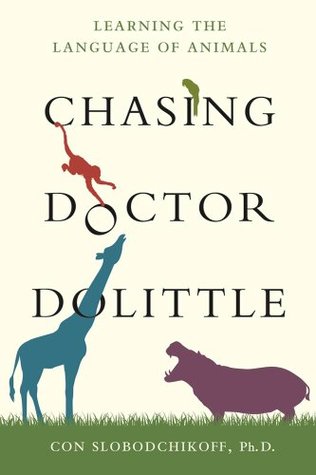
Chasing Dr. Dolittle,
How Animals Grieve,
And Playing Along,
'Cause I'll need a reprieve.
I can read Half the Sky,
Check my BlindSpot,
Look on the Bright-Sided,
For bored I'll be not!
Cooked and Gulp,
Because Taste Matters.
When I'm finished with the first,
I'll read the latter.
Morality for Muggles and
Politics of Harry Potter,
Quite interesting reading,
not just fanciful fodder.
One Nation Under Stress,
Maphead, and Contagious.
I better stop here,
This list is outrageous!
Happy Holidays from the Library Staff! If you need a good book to read over the break, come on in and check out our New Book selection conveniently located on our NEW BOOK SHELF. Some titles have been moved into the regular collection to make room for more new books, but we can always help you find what you're looking for!
Don't forget, we also have audiobooks and movies! With over 2,000 films to choose from, including documentaries, feature length films, popular classics, Academy and Film Festival award winners and a variety of educational topics ranging from psychology to religion, history to sociology, and music and art – there is something for all appetites. Don’t delay. Come in and check out the offerings. You will be pleasantly surprised!


The Library crew!
They'll have the answers,
And know just what to do!
I'll even bet
They have a shelf
Filled with new books
By the Library Elf!
Chasing Dr. Dolittle,
How Animals Grieve,
And Playing Along,
'Cause I'll need a reprieve.
I can read Half the Sky,
Check my BlindSpot,
Look on the Bright-Sided,
For bored I'll be not!
Cooked and Gulp,
Because Taste Matters.
When I'm finished with the first,
I'll read the latter.
Morality for Muggles and
Politics of Harry Potter,
Quite interesting reading,
not just fanciful fodder.
One Nation Under Stress,
Maphead, and Contagious.
I better stop here,
This list is outrageous!
Happy Holidays from the Library Staff! If you need a good book to read over the break, come on in and check out our New Book selection conveniently located on our NEW BOOK SHELF. Some titles have been moved into the regular collection to make room for more new books, but we can always help you find what you're looking for!
Don't forget, we also have audiobooks and movies! With over 2,000 films to choose from, including documentaries, feature length films, popular classics, Academy and Film Festival award winners and a variety of educational topics ranging from psychology to religion, history to sociology, and music and art – there is something for all appetites. Don’t delay. Come in and check out the offerings. You will be pleasantly surprised!


Monday, October 14, 2013
Diet Analysis Tips & Tricks (updated)

1) Where is the software available?
Students can purchase online access/subscription access and can use it anywhere they can get online. Students can also access it for free here in the library on several laptops that still run Windows XP.
2) How can I save reports as a pdf?
You don't actually save the documents as a pdf, you 'print' them to a virtual printer (primopdf) which creates the pdf file. If a student wants a physical printout they print the file to the laptop printer as usual.
3) How do I use Primopdf to create the pdf files?
Here is a link to a basic set of instructions.
4) How do I upload my reports to my instructor?
Most of the time if we get asked this it is because the student is trying to upload the files in the wrong place. Assignment 1 is listed in the class shell (iLearn) in two different ways.
 The first listing is the word document with the assignment details. Students cannot upload files into a word document. This is the word document icon.
4) How do I upload my reports to my instructor?
Most of the time if we get asked this it is because the student is trying to upload the files in the wrong place. Assignment 1 is listed in the class shell (iLearn) in two different ways.
The first listing is the word document with the assignment details. Students cannot upload files into a word document. This is the word document icon.
Please let me know if I have missed a question that comes up for this program, or if you have any questions.
Dana
UPDATE: Logging in to Short Term or OPAC computers
UPDATE: We had to make a change to the OPAC computer logins. Instead of all 7 computers using the login Guest, each computer now has a unique login Guest###. The number to be included after the word guest is the computer number in yellow at the bottom of the monitor screen. (guest019 or guest 022). You will also find the hole login sequence at the top of the monitor on a while label. Please let us know at the reference desk if you have questions.


Easy Screen Caps on the Reference computer
Help with creating images from your computer screen. I set up access to a couple of snipping utilities on the reference computer to try and help with creating libguides and tutorials.

Jing: Jing® is a computer service that let’s you capture basic video, animation, and still images, and share them on the web. Here is a link to a series of Jing tutorials if you are not familiar with using Jing. http://www.techsmith.com/tutorial-jing.html
 I also placed a shortcut to the Windows Snipper tool in the taskbar near the bottom of the screen. Here is a link to a Windows Snipper tutorial: http://windows.microsoft.com/en-us/windows7/products/features/snipping-tool or just an faq: http://windows.microsoft.com/en-us/windows7/snipping-tool-frequently-asked-questions
Reference Computer/Account Updates
As most of you know by now we have successfully setup Cybraryn Remote on the reference computer under the reference account. This will allow you to monitor student computer sessions, extend time, remote login and clear locked user accounts from the reference computer. If needed we can also do a remote screen capture.
Please let me know if you have any questions about the operating or purpose of this utility.
Please let me know if you have any questions about the operating or purpose of this utility.
Monday, May 06, 2013
Monday, April 15, 2013
Monday, March 11, 2013
Five Criteria for Evaluating Websites PPT
UPDATE:
After comments via email and Dolores and Gloria helping out in person. I have made many edits. Please review again and AGAIN give your feedback? It is also OK to say WHY.....?
Dana
Reference Librarians ....
Doug and I were talking about coming up with a Gavilan version of the Five Criteria we have been using from Cornell University (http://olinuris.library.cornell.edu/ref/research/webcrit.html). Here is my first run at it.... Please comment here or send me suggestions by email.
Thanks
I found a better way to host and embed the powerpoint. However, here is a link to the hosted file if you want it: http://portal.sliderocket.com/DGZWR/Five-Criteria-for
Thursday, February 28, 2013
Accreditation Visit
In preparation for the accreditation visit next week, you may want to review our self study. The relevant section deals with Standard IIC, Student Learning Programs and Services.
The accreditation team will have with them the Guide to Evaluating Institutions, which includes the standards and a set of critical questions to answer about each. These questions provide a useful tool for the team to make sure each standard is appropriately addressed. The critical questions for Standard IIC are on pages 31-37.
Questions or concerns? Please contact me! I want to know!
GAVILAN Self-Study for Standard IIC
Evidence for Standard IIC
Guide to Evaluating Institutions (see pp.31-37)
Entire Gavilan Self-Study
-Doug
The accreditation team will have with them the Guide to Evaluating Institutions, which includes the standards and a set of critical questions to answer about each. These questions provide a useful tool for the team to make sure each standard is appropriately addressed. The critical questions for Standard IIC are on pages 31-37.
Questions or concerns? Please contact me! I want to know!
GAVILAN Self-Study for Standard IIC
Evidence for Standard IIC
Guide to Evaluating Institutions (see pp.31-37)
Entire Gavilan Self-Study
-Doug
Thursday, February 21, 2013
LIB736 / PSYC Students
If a student adds Dr. Oler's Psyc class after the class was set up they need to be added manually.
If one of Dr. Oler's students comes in asking why they cannot access LIB736, get their name and G00 number and section or day/time they meet and send me an email with the information. I will verify that they are in the class and get them added to the class.
If one of Dr. Oler's students comes in asking why they cannot access LIB736, get their name and G00 number and section or day/time they meet and send me an email with the information. I will verify that they are in the class and get them added to the class.
Thanks
Dana
Changes To The Library Homepage
Please take a look at the new homepage. The look is not permanent because we will be reworking the entire thing soon. We started with adding a tabbed box featuring Gavilan OneSearch. Please dive in and put OneSearch through its paces!
Also let me know if there is anything you think we need to add to the box.
Dana
Also let me know if there is anything you think we need to add to the box.
Dana
Wednesday, February 13, 2013
Remote Database Access Change in Login
Starting today.... In order to access our databases from off campus patrons will use their whole library card number.
I am leaving the masks in place for a while but soon they will stop working. Please let me know if you have any questions.
Dana
I am leaving the masks in place for a while but soon they will stop working. Please let me know if you have any questions.
Dana
DietAnalysisPlus FAQ
Periodically we get questions about the DietAnalysis project for AH11. Here are some of the most common questions...
1) Where is the software available?
Students can purchase online access/subscription access and can use it anywhere they can get online. Students can also access it for free here in the library on several laptops that still run Windows XP.
2) How can I save reports as a pdf?
You don't actually save the documents as a pdf, you 'print' them to a virtual printer (primopdf) which creates the pdf file. If a student wants a physical printout they print the file to the laptop printer as usual.
3) How do I use Primopdf to create the pdf files?
Here is a link to a basic set of instructions.
4) How do I upload my reports to my instructor?
Most of the time if we get asked this it is because the student is trying to upload the files in the wrong place. Assignment 1 is listed in the class shell (iLearn) in two different ways.

The first listing is the word document with the assignment details. Students cannot upload files into a word document. This is the word document icon.
4) How do I upload my reports to my instructor?
Most of the time if we get asked this it is because the student is trying to upload the files in the wrong place. Assignment 1 is listed in the class shell (iLearn) in two different ways.
The first listing is the word document with the assignment details. Students cannot upload files into a word document. This is the word document icon.

The second listing is the actual 'iLearn' assignment where the student can upload the files. Here is the assignment icon.
Please let me know if I have missed a question that comes up for this program, or if you have any questions.
Dana
Monday, February 04, 2013
What is Where ... update

I figured it was time for a What is Where update about the student computers. There have been several changes due to the new student computers installed last spring.
- Diet Analysis (+pdf printer) -- Laptops with Windows XP
- Final Draft -- LIB006 (being added soon)
- Gaspar (Spanish language program) -- Available as a download to Spanish language students from iLearn
- Kurzweil (oral reader for online resources) and other accessibility programs -- LIB006-LIB007, LIB017
- Photoshop elements -- LIB 016 - LIB017
We will be updating and adding programs during Spring Break 2013.
Please let me know if you have any questions or additions
Dana
Subscribe to:
Posts (Atom)